SFHouseFinder: How I Automated the Bay Area Rental Hunt
If you’ve ever tried to rent an apartment or house in San Francisco, you know the pain: dozens of tabs, the same listings reposted everywhere, and the constant anxiety that you’re missing something. I got tired of the grind. So I built SFHouseFinder—a tool that does the searching, filtering, and organizing for me, so I can focus on actually finding a place, not just hunting for one.
Why I Built It
I wanted a tool that would:
- Aggregate listings from Craigslist, Apartments.com, and Zillow
- Remove duplicates and expired posts
- Let me quickly mark what I’ve seen, what’s interesting, and what’s not
- Run automatically, so I don’t have to babysit it
But I also wanted to learn more about web scraping, data normalization, and building a dashboard that’s actually pleasant to use. And, honestly, I wanted to help my friends who were also stuck in the rental search loop.
How It Works
Scraping Architecture: Raspberry Pi, Proxies, and Cron
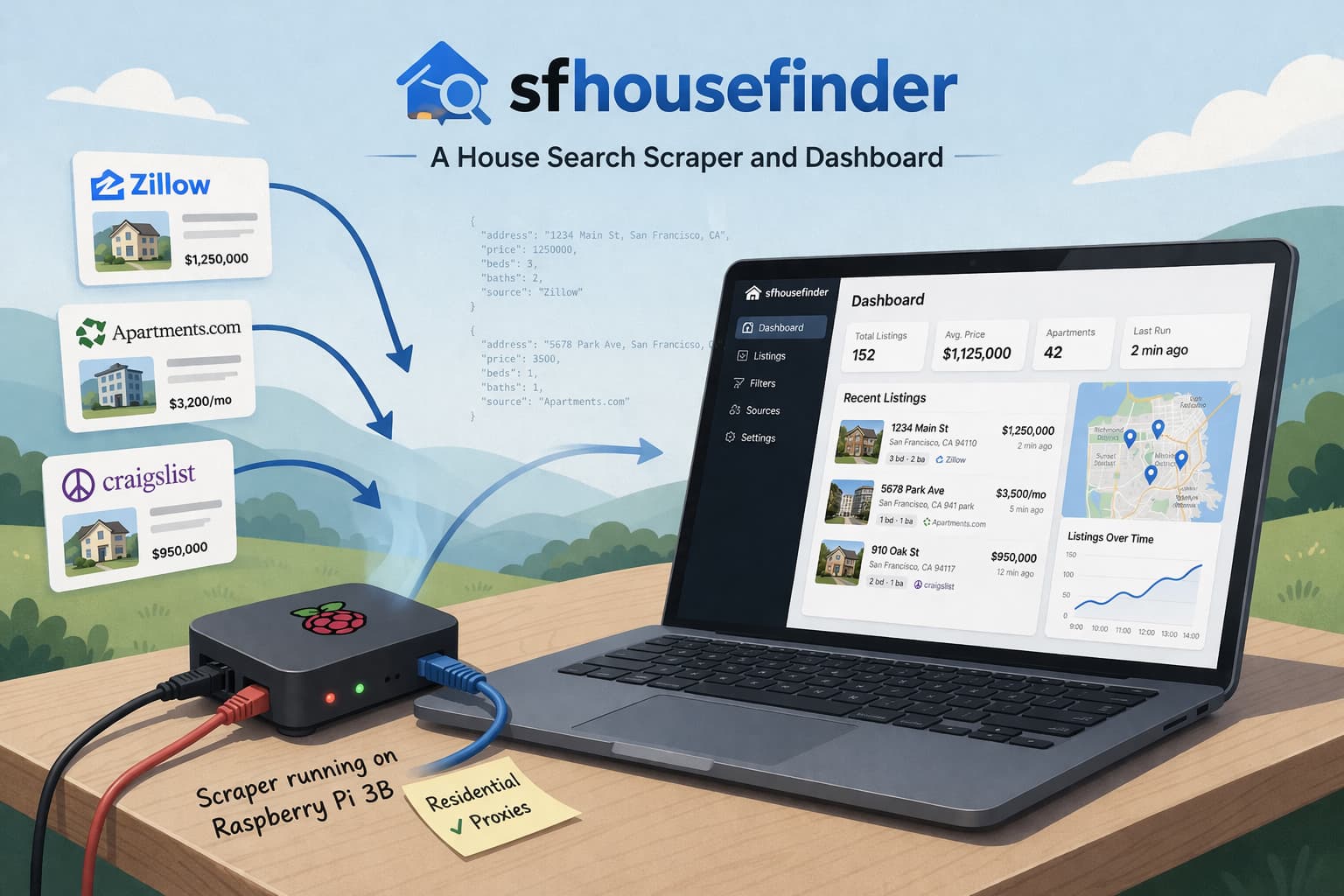
The backbone of SFHouseFinder is a set of custom scrapers, all written in TypeScript. These run on a Raspberry Pi 3B that sits on a shelf in my house, quietly doing its thing 24/7. I chose the Pi because it’s cheap, low-power, and—let’s be honest—fun to tinker with. It’s surprisingly reliable for this kind of job, and if it crashes, it just auto reboots itself.
To avoid getting blocked by Craigslist, Apartments.com, and Zillow, I use Evomi for residential proxies. This means every request looks like it’s coming from a real person in a real house, not a datacenter. The scrapers rotate proxies for each run, and I built in exponential backoff and retry logic to gracefully handle rate limits and temporary bans. If a proxy gets blocked, the scraper logs the event and moves on, so the pipeline never fully stalls.
All the scraping jobs are scheduled with cron, running every few hours. Each run fetches the latest listings, parses the HTML, and extracts structured data: address, price, neighborhood, link, description, and images. I wrote custom parsers for each site, since their layouts and anti-bot measures are all a little different. Craigslist, for example, is simple but quirky; Apartments.com is more structured but has more aggressive bot detection.
Data Pipeline: Normalization, Deduplication, and Validation
Once the raw data is scraped, it flows through a normalization pipeline. Addresses are cleaned up (removing weird unicode, standardizing abbreviations), prices are parsed and converted, and links are canonicalized. This is crucial because the same listing can appear on multiple sites, or be reposted with slight changes.
Deduplication is a constant battle. I use a combination of address, price, and fuzzy string matching on descriptions to catch duplicates. If two listings have the same address and similar prices, but slightly different descriptions, they’re flagged for review. I also check for expired or deleted posts by re-checking the original links on each run—if a listing is gone, it’s marked as inactive but kept in the database for reference.
Validation is layered: some checks run on the Pi (like basic field presence and link health), while deeper validation (like image availability or source-specific quirks) can be triggered manually from the dashboard. This helps keep the dataset clean without being too aggressive and accidentally deleting good leads. All data is stored in MongoDB, which is a good fit for the semi-structured nature of rental listings..
Dashboard: UX, Filtering, and Workflow
The dashboard is where everything comes together. Built with Next.js and React, styled with Tailwind CSS and shadcn/ui, and deployed on Vercel, it’s designed to be fast and focused. I wanted something that worked just as well on my phone as on my laptop, since I’m often checking listings on the go.
Key features:
- Unified feed: All listings from all sources, deduplicated and sorted by newest first.
- Quick filters: Instantly hide listings I’ve marked as “Not Relevant,” or show only new/unseen places.
- Notes: Add personal notes to any listing (e.g., “emailed landlord,” “too far from BART”).
- One-click actions: Mark as seen, not relevant, or favorite with a single tap.
- Direct links: Open the original post in a new tab, so I can apply or contact the landlord right away.
Challenges and Surprises
The biggest challenge was keeping the scrapers running reliably. Sites change their layouts all the time, and anti-bot measures are getting smarter. I set up Discord notifications for scraper errors, so I know right away if something breaks. Sometimes a site will block all proxies for a few hours, so I built in logic to pause and retry later instead of hammering the site and getting permanently banned.
Another surprise was how much time I spent on data quality. It’s easy to scrape a bunch of junk; it’s much harder to keep the dataset clean, deduplicated, and actually useful. I ended up writing a lot of custom logic for edge cases—like listings with missing addresses, or posts that get deleted and then reposted with a new ID.
What I’ve Learned
Building SFHouseFinder has been a crash course in web scraping, data engineering, and product design. I’ve learned that automation is only as good as the quality of the data you feed it, and that the best tools are the ones you actually use every day. I’ve also learned to expect breakage and build for easy recovery—whether that’s rebooting the Pi, swapping out a dead proxy, or quickly patching a parser when a site changes.
What’s Next
There’s still a lot I want to add: more sources (like Facebook Marketplace and PadMapper), smarter duplicate detection, and better ways to share listings with friends or roommates. I’m also experimenting with simple analytics—like tracking which listings get the most clicks or notes—to help prioritize the best leads.
Ultimately, SFHouseFinder started as a way to make my own life easier, but it’s become a tool I’m proud to share with others. If you’re stuck in the Bay Area rental grind, or just want to geek out about scraping and automation, feel free to reach out!
Lessons Learned
- Scraping is a moving target. Sites change their layouts, add anti-bot measures, and sometimes just break for no reason. Running the scrapers on a Pi with rotational Evomi proxies made it possible to keep things running without constant manual fixes.
- Data quality is everything. The hardest part wasn’t getting the data, but making sure it was clean, deduplicated, and actually useful. I spent more time on normalization and validation than anything else.
- Build for yourself first. Because I was the main user, every annoyance became a reason to improve the product. The dashboard is fast because I needed it to be fast. The filters are simple because I wanted to use them every day.
What’s Next
I’m planning to add more sources, smarter filters, and better ways to share listings with friends. But for now, SFHouseFinder has made my rental search less stressful and a lot more efficient.
If you’re tired of the rental search grind, or just want to see how it works, reach out! I’m always happy to share what I’ve learned—or just commiserate about Bay Area rent.